
Plans
View and change your plan in Settings > Pricing.
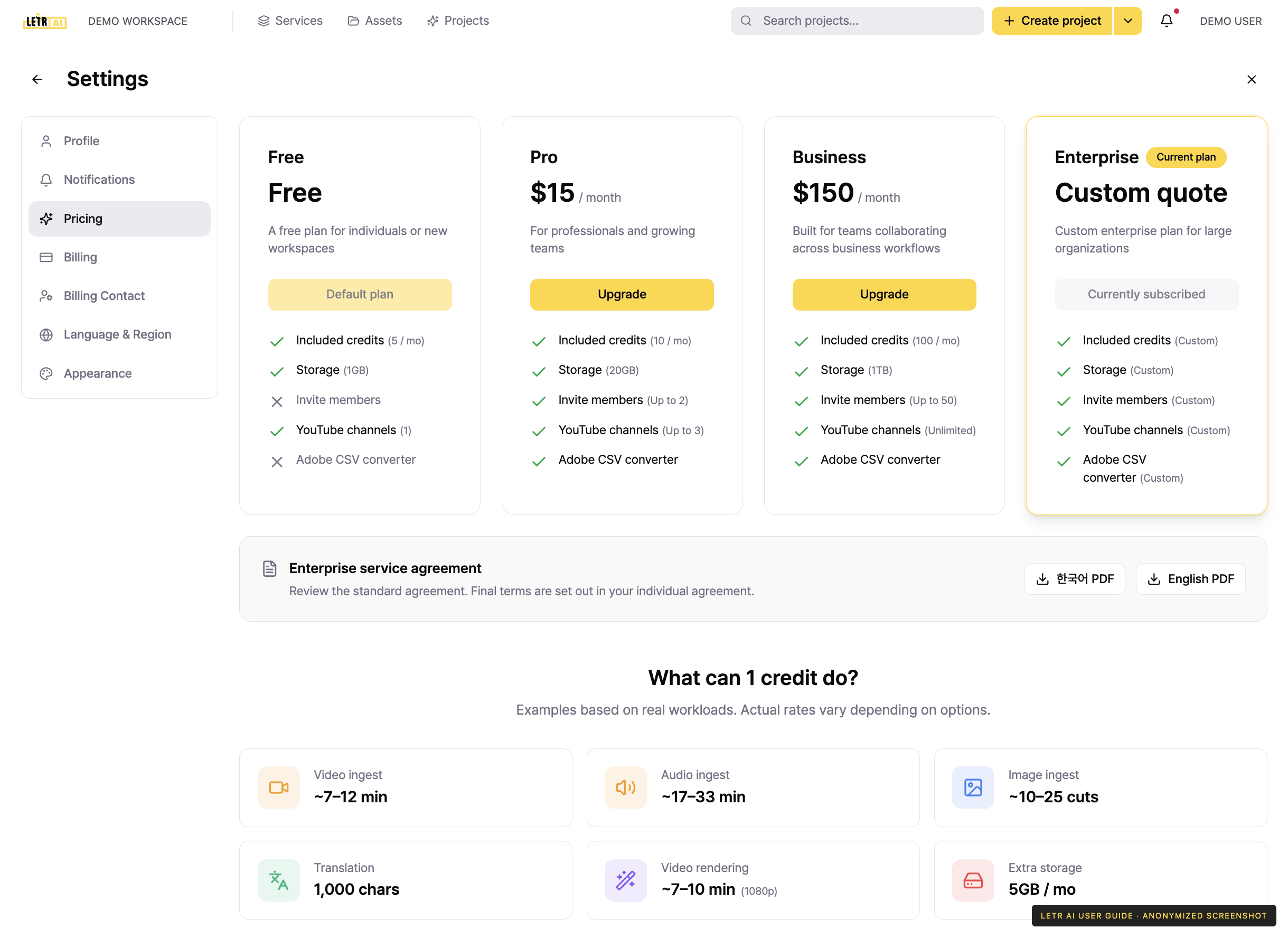
Your active plan is marked Current plan; the others show an upgrade or downgrade button.
The plans#
| Plan | For |
|---|---|
| Free | Individuals or new workspaces |
| Pro | Professionals and growing teams |
| Business | Teams collaborating across business workflows |
| Enterprise | Large organizations, on a custom quote |
Each plan sets its own ceiling on:
- Included credits (per month)
- Storage
- Invited members
- YouTube channels
- Adobe CSV converter
What 1 credit does#
Below the plans, the screen translates one credit into real workload.
| Work | Roughly |
|---|---|
| Video ingest | ~7–12 min |
| Audio ingest | ~17–33 min |
| Image ingest | ~10–25 cuts |
| Translation | 1,000 chars |
| Video rendering | ~7–10 min (1080p) |
| Extra storage | 5GB / mo |
Frequently asked questions#
The bottom of the Pricing screen answers:
- How is plan pricing structured?
- How much is 1 credit?
- Do credits roll over to next month?
- What happens when credits run out?
- Are services different per plan?
- Can I change plans anytime?
- What is the refund policy?
Account and contact details in screenshots are anonymized. Menus may vary by role and release.