General settings
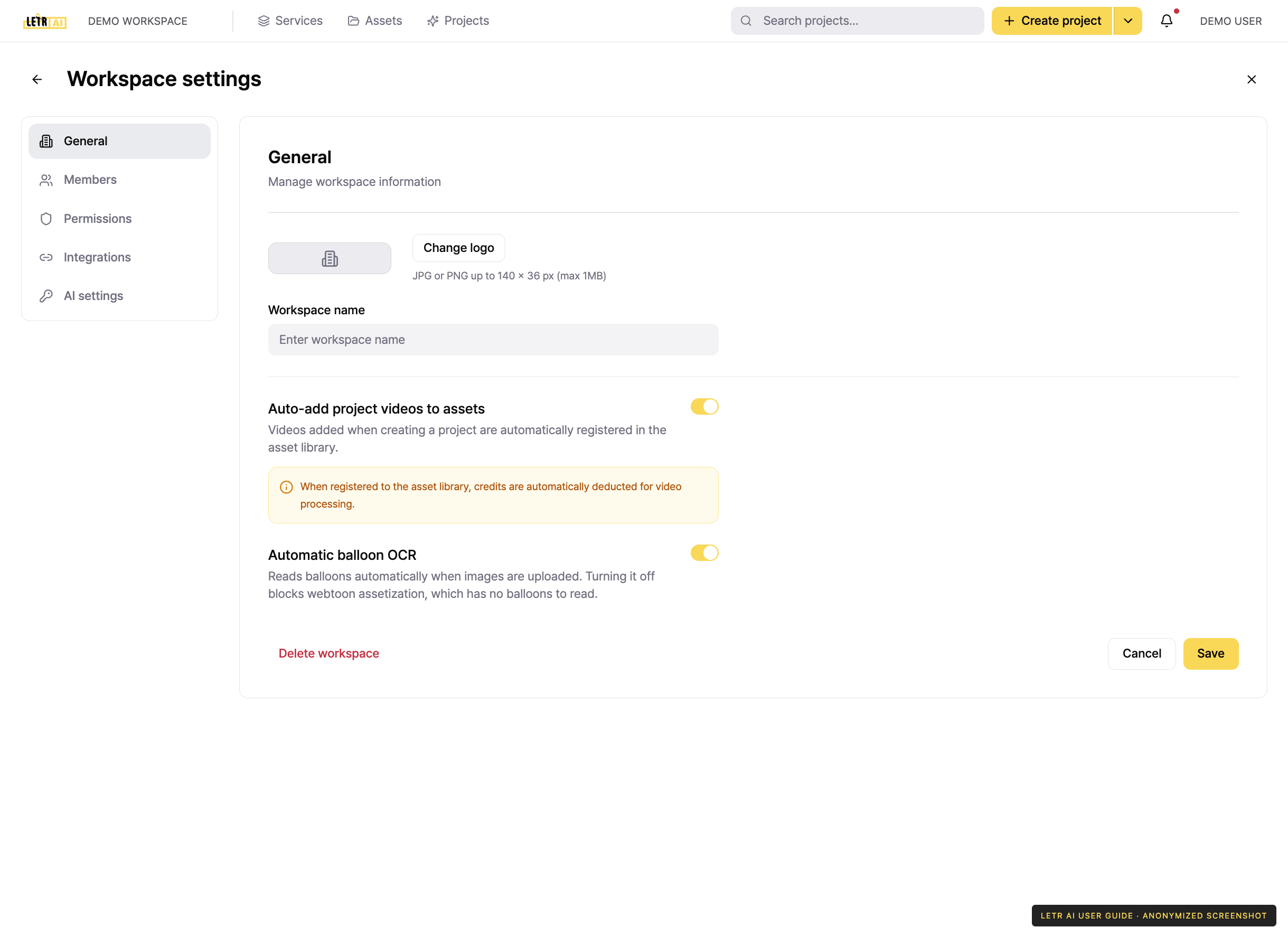
Open workspace settings by clicking the workspace name at the top left and choosing Workspace settings. The current production screen includes General, Members, Permissions, Integrations, and AI settings.
Logo#
Press Change logo to upload your workspace logo.
- Dimensions — up to 140 × 36 px
- Size — up to 1MB
- Format — JPG or PNG
Workspace name#
Enter the name to display in Workspace name and press Save. This is the name shown at the top left of the global header.
Auto-add project videos to assets#
With this switch on, videos added when creating a project are registered in workspace assets automatically.
Automatic speech-bubble OCR and AI settings#
General includes an Automatic speech-bubble OCR switch. Check whether automatic recognition is enabled before starting image or webtoon work.
AI settings is a separate menu for AI-related workspace defaults. Available options can vary by workspace and release. Check the scope and credit notice before changing automatic processing options.
Deleting a workspace#
Delete workspace at the bottom left removes the workspace.
Account and contact details in screenshots are anonymized. Menus may vary by role and release.